
Chick-fil-A®
Chick-fil-A, Inc.Food & Drink
4.570.13K Reviews
- Version
- 2026.22.0
- Installs
- 10.00M
- Age Rating
- Everyone
Screenshots
Our Review of Chick-fil-A®
 Analysis by Appyee
I find the Chick-fil-A app most useful when I treat it as a practical part of a visit rather than a reason to make one. Its main job is to help me plan an order, keep track of eligible rewards, and make the handoff less rushed. That makes it a good fit for people who already stop at Chick-fil-A, whether regularly or occasionally, and less compelling if the restaurant is not a convenient choice for them.
It is a free Food & Drink app from Chick-fil-A, Inc., rated for Everyone. The app has a 4.5 average from around 206,000 ratings, and it has passed 10 million installs. Those figures suggest a well-established service, but the useful question is simpler: does its ordering routine suit the way you actually eat? In my view, it can, especially if you prefer deciding what to get before arriving instead of working through the menu at the counter.
A routine that starts before you arrive
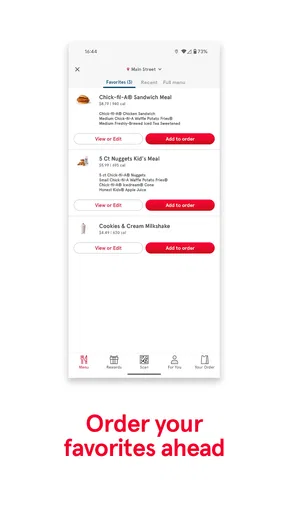
My baseline workflow is straightforward: check the menu, choose a nearby restaurant, build the order, and review it before placing it. The key benefit is not merely tapping faster. It is having a moment to consider the meal without holding up someone behind me. For a workday lunch, I can settle on the items I want before leaving, then use the app to make the visit more predictable.
Order-ahead convenience still depends on choosing the right location and allowing enough time. I would not assume that placing an order means it will be ready the instant I walk in; I use the app to plan, then follow the pickup instructions shown for that order. If I am already standing inside and the line is short, ordering directly may be just as easy. The app is most valuable when it gives me time back, not when I use it automatically for every visit.
Settings and choices worth checking
Account setup is part of the first-use experience, and I would take a moment to review the account details and any app preferences rather than rushing through them. In particular, check that you have selected the restaurant you intend to visit before building an order. A carefully customized meal sent to the wrong location is a frustrating kind of convenience. Before confirming, I also look over the order summary so changes to ingredients or choices have not been missed.
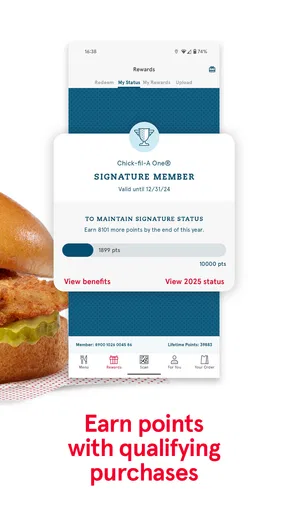
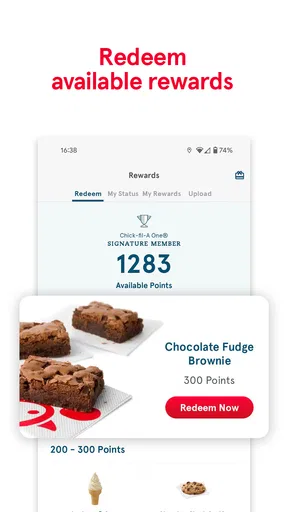
Rewards are another reason to pay attention to the account you are using. Qualifying purchases can earn points, and available rewards can be redeemed through the app. I would check the rewards area before ordering if I am hoping to use one, then make sure the final order reflects that choice. Points are a useful extra, but they are not a reason to add food I did not want; the best value comes when a reward fits a meal I would have bought anyway.
Faster habits for repeat visits
After a few visits, I find it helpful to settle on a simple routine: confirm the location, make the order, check the total and reward status, and only then submit. This small sequence catches common avoidable mistakes without turning a quick lunch into a project. If I am ordering for someone else, I ask about customizations first and review each item before checkout. That is easier than trying to remember a last-minute change once the order is underway.
For a realistic weekday example, imagine I have a short lunch break and already know what I want. I can place the order before leaving, head to the selected restaurant, and spend less of the break deciding at the counter. On another day, if I am meeting a friend who has different preferences, I can use the menu and customization choices to work through both meals before we arrive. The time saved varies with the location and the moment, so I see advance ordering as a planning tool rather than a guarantee of a faster pickup.
Where the convenience has limits
This is a restaurant-specific app, so it cannot replace a general food-ordering service when I am comparing meals from several businesses or want a broad range of cuisines. A restaurant’s own app can make sense when I know where I want to eat; an aggregator is usually more useful when I have not decided. Likewise, if I prefer to ask questions face to face or change my mind while looking at the menu, ordering with staff may feel more natural than building the meal on a phone.
There is also a small trade-off in moving decisions earlier. Customizing an order is handy, but it asks me to read the options carefully and check the summary before submitting. A phone screen can make it easy to tap through without noticing a choice, particularly when I am in a hurry. I avoid that by reviewing the order once, rather than assuming every selection is right because the process felt simple. Rewards add another step, so I keep them as a bonus rather than the centerpiece of the visit.
The app has been available since December 20, 2013, and its current version is 2026.2.2. That long-running presence is reassuring for a service built around repeat visits, while updates are a reason to re-familiarize myself with the screens if the ordering flow changes. It supports devices running Android 9 or later. If you are deciding whether to install it, the practical test is whether you visit often enough to appreciate having your ordering and rewards in one place.
It is also worth thinking through the less routine situations. If I am traveling, I use the location finder to identify a nearby restaurant, then check the selected location and its hours before relying on it as a stop. For a group order, I would gather everyone’s choices first and enter them deliberately; the app can help organize the order, but it cannot resolve disagreements about what everyone wants. When timing matters, I leave room for the actual pickup process instead of treating the order-ahead option as a promise that the meal will be waiting at a precise moment.
Who will get the most out of it
I would recommend it to people who already know they enjoy Chick-fil-A and want a repeatable way to order, customize a meal, and keep qualifying-purchase points together. It is especially handy when I have a predictable lunch routine, want to make a considered choice before arriving, or am checking which restaurant is practical during a drive. Occasional customers can still use it, but the rewards side naturally matters less if visits are rare.
I would skip it if I do not plan to eat at Chick-fil-A, do not want another restaurant account, or prefer choosing from multiple restaurants in one place. I would also use the counter when I need a conversation to decide what to order or when the app would add more steps than it saves. That is the useful distinction: the app improves a familiar visit, but it does not make every dining situation better.
Getting Started with the App
First things first, the download process is a breeze. Available on both Android and iOS, you can find it easily on the Google Play Store or the Apple App Store. After a quick installation, I was greeted with a clean, user-friendly interface that had me eager to explore.
Setting up an account was straightforward. A few taps to input my details, and I was ready to dive into the world of Chick-fil-A®. They’ve really streamlined the sign-up process, making it quick and painless, which I appreciated.
Exploring the Features
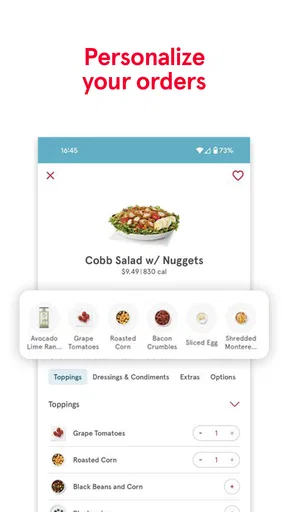
One of the coolest features of the app is the ability to customize your order. We all have that one friend who loves extra pickles, and this app has got you covered. With just a few taps, you can tweak your order to your heart's content, ensuring you get exactly what you're in the mood for.
I also loved the mobile ordering feature. Let's be honest, waiting in line can be a drag, especially during peak hours. With the app, you can place your order ahead of time and skip the line. Trust me, this feature is a lifesaver during lunch breaks or when you're in a hurry.
Another aspect worth mentioning is the rewards program. Every purchase earns you points, which you can later redeem for free food. Who doesn't love free food? The app keeps track of your points, making it easy to know when you’re eligible for your next treat.
Navigation and Usability
In terms of navigation, the app is a breeze to use. The layout is intuitive, with a clear menu and easy access to all features. Whether you're placing an order, checking your points, or browsing the menu, everything is just a tap away.
The app also offers a location finder, which is perfect for those road trips when you're craving a chicken fix. You can easily find the nearest Chick-fil-A® location, view their hours, and even get directions. It's like having a personal assistant dedicated to your chicken cravings.
My Personal Experience
During my time using the app, I noticed how much it enhanced my overall dining experience. The convenience of ordering ahead and the thrill of earning rewards made each visit more enjoyable. Plus, the customization options allowed me to try new combinations that I wouldn't have considered before.
Customer service is also top-notch. The app occasionally offers exclusive promotions and deals, which is a nice touch. I once got a free milkshake just for using the app to place my order. Little surprises like these make the app not just a tool, but a delightful companion.
Final Thoughts
In conclusion, the Chick-fil-A® app is an excellent choice for anyone who enjoys convenience and rewards. From easy ordering to earning perks, it truly enhances the dining experience. If you're a fan of their delicious offerings, this app is a must-have on your phone.
Whether you're a regular or an occasional visitor, the app caters to all your needs, making each visit smoother and more enjoyable. So go ahead, give it a try, and see how it transforms your next Chick-fil-A® visit!
A more useful way to judge the rewards
I would treat points as a record of purchases that may lead to an available reward, not as a discount I can count on for every meal. Before I place an order, I check whether there is something I can actually redeem and whether it suits what I planned to eat. If not, I simply continue with the order. This keeps the reward feature convenient instead of turning it into a reason to spend more or to choose a meal I do not want.
For someone deciding whether an account is worthwhile, the central question is how often they expect to use it. A regular customer is more likely to appreciate having points and ordering in one place, while someone making a one-off visit may find the account setup less useful than ordering at the restaurant. Either way, I would not let the rewards screen determine the meal; I use it as a quick check, then make the food choice on its own merits.
Small checks that prevent avoidable hassle
My most useful habit is to pause at the order summary, especially when I have changed several items. I read each line, confirm the chosen restaurant, and make sure the meal still matches what I meant to order. That quick review matters more when I am placing an order for another person, since a small customization can be easy to overlook while tapping through a menu.
If plans change after I have submitted an order, I do not assume the app can undo or edit it in every situation. I check the order screen and follow the available instructions or ask the restaurant directly if I need help. That is a sensible limit for any advance-order workflow: the phone helps me place the request, but it does not remove the need to pay attention once I have sent it.
Choosing the right ordering channel
Compared with ordering at the counter, the app gives me more time to consider customizations and lets me prepare before arrival. The counter has the advantage when I want to ask a question, make a quick spontaneous choice, or avoid signing in. Compared with a multi-restaurant delivery or ordering service, the Chick-fil-A app is narrower but more focused on this one restaurant’s menu, location selection, and rewards. I choose the channel based on the decision I need to make, not because one method is always superior.
For a family or a small group, I find it useful to collect everyone’s choices before opening the ordering flow. That avoids passing a phone around while people are still debating, and it makes the final review more reliable. For a solo visit, I keep the routine lighter: choose the location, select the meal, verify the order, and submit only when I am ready. These habits are simple, but they make the app feel less like another task and more like a useful shortcut.
My verdict after weighing the trade-offs
The Chick-fil-A app is a sensible companion for people who already enjoy the restaurant and want a practical way to plan orders and follow rewards. I like it most when I know what I want, can choose the correct location in advance, and have enough time to check the details. I am less likely to use it for an unplanned stop where the counter is quicker, or when I am still comparing different restaurants.
That balance is why I recommend it without calling it essential for everyone. It is free, focused, and useful when its ordering and rewards fit your routine; it is not a general dining guide or a substitute for asking staff when you need personal help. If you visit Chick-fil-A often enough to value a steady ordering habit, I think it is worth trying. If you rarely go, decide based on whether the convenience of preparing a visit ahead of time is valuable to you.
Privacy and Permissions
See what permissions an app requests and how it handles your data.
- Location
- approximate location (network-based), precise location (GPS and network-based)
- Camera
- take pictures and videos
- Other
- view network connections, full network access, control Near Field Communication, run at startup, control vibration, prevent device from sleeping
Verdict
Strengths of Chick-fil-A®
- User-friendly interface and smooth navigation.
- Customization options for menu items.
- Convenient curbside pickup and delivery.
- Exclusive offers and rewards for app users.
- Quick and easy payment through the app.
Limitations of Chick-fil-A®
- Limited availability in certain regions.
- Notifications can be excessive at times.
- Occasional app crashes or slow loading.
- Menu updates may not be timely.
- Requires account creation for full features.
Other Releases by Chick-fil-A, Inc.
View All
Chick-fil-A Play
Entertainment4.0
Similar Picks in This Category
View All
Rappi: Food Delivery, Grocery
Rappi, Inc - Delivery3.5

McDonald’s: Cupons e Delivery
Arcos Dorados4.3

Swiggy: Food Instamart Dineout
Swiggy4.7

Blinkit: Groceries & more
Blinkit4.8

foodpanda: food & groceries
Foodpanda GmbH a subsidiary of Delivery Hero SE4.0

Zomato: Food Delivery & Dining
Zomato4.7
Frequently Asked Questions
What features does the Chick-fil-A® app offer?
The Chick-fil-A® app provides a range of features including mobile ordering, payment options, and the ability to customize orders. Users can also earn points through the Chick-fil-A One® membership program, which can be redeemed for free menu items. Additionally, the app offers a location finder and personalized recommendations.
How does the Chick-fil-A One® membership work?
The Chick-fil-A One® membership allows users to earn points with every purchase made through the app. These points can be accumulated to unlock rewards and reach higher membership tiers, such as Silver, Red, and Signature. Each tier offers exclusive benefits, such as birthday rewards and early access to selected promotions.
Is it possible to customize orders through the app?
Yes, the Chick-fil-A® app allows users to fully customize their orders. Whether you want to adjust toppings, sauces, or sides, the app provides an intuitive interface to cater to your preferences. This feature ensures that every meal is tailored to individual tastes before checkout and pick-up.
Are there any nutritional information and allergen details available in the app?
The Chick-fil-A® app provides detailed nutritional information and allergen details for all menu items. Users can easily access this information to make informed decisions about their meals, catering to dietary preferences and restrictions. This feature is particularly useful for those with specific health considerations.
Can I use the app to find Chick-fil-A® locations and operating hours?
Yes, the app includes a location finder that provides directions to the nearest Chick-fil-A® restaurants. It also displays operating hours, ensuring you can plan your visits accordingly. This feature helps users find convenient locations whether they are at home or traveling.
